Purpose
Ensure Suede’s collections process is professional, compliant, and efficient by providing clear guidelines for merchant outreach, account review, payment resolution, settlements, and third-party escalation while protecting sensitive merchant information.
Authentication / Account Verification (Inbound & Outbound)
Do NOT discuss account details until verification is complete.
Verify:
- Merchant Name
- Caller association with business
- One secondary identifier:
- Last 4 EIN/SSN
- Business address on file
- Phone number on file
Rules:
- If authentication fails → do not proceed
- Do NOT provide balance or account details
- Log attempt in CRM / Collection Ticket
Reference: For full guidance on authentication procedures, see Basic and Top-Level Call Authentication
Collections Report Workflow (Ticket & CRM Process)
Navigate to Ticket Module
- Click RPT → Collections Report.
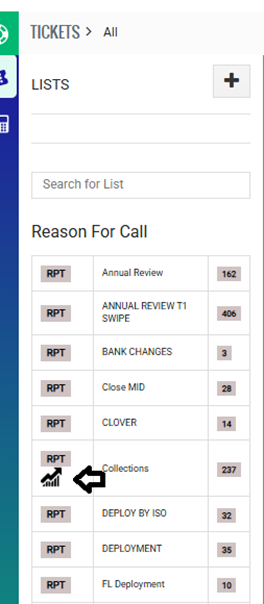
- Apply the following filters then click Search:
- Collection Company = Internal/House
- Create Date = Default three-month review period
- Example: 04/15/2026 – 07/14/2026
- Adjust the date range as needed based on the required review period.

- Under the To Do column, click the wheel icon.

- Update the section based on the action being taken:
- Add notes under Important Notes ONLY.
- DO NOT change Collection Status.
- Click Save once complete.
- Activity will automatically display after saving.
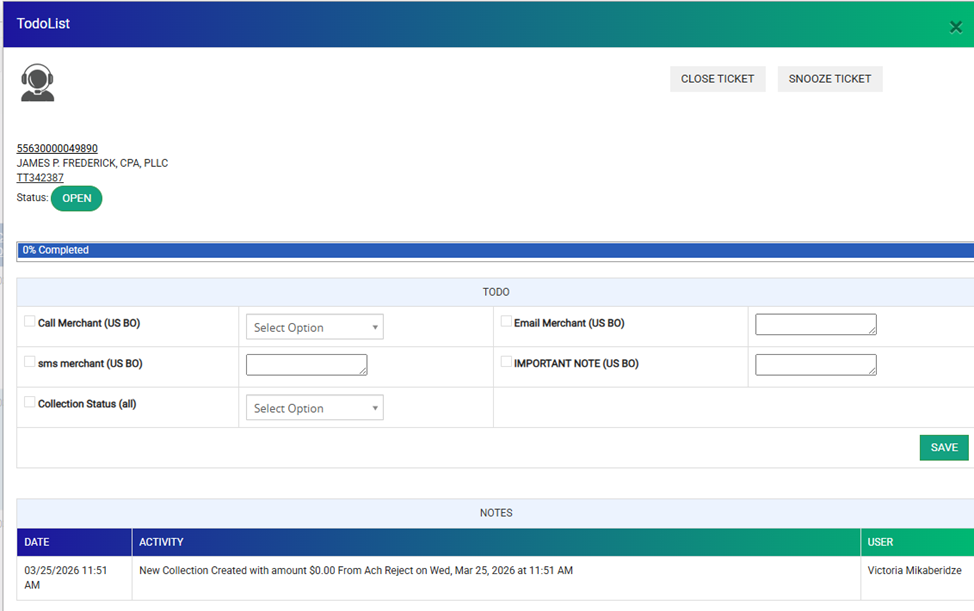
- Activity will automatically display after saving.
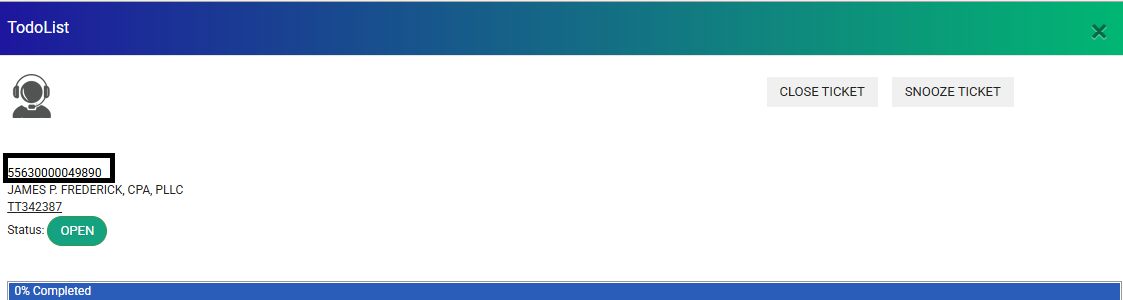
- Click the MID to open the merchant account.
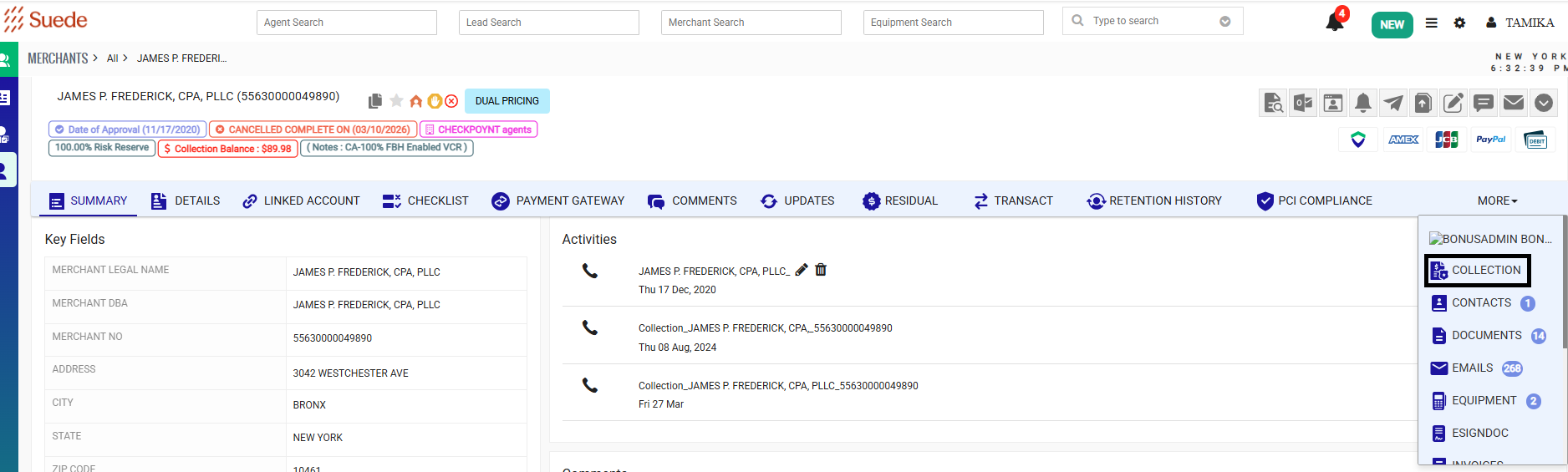
- Navigate to the Collection Module within the account and update accordingly.
- Return to the ticket and confirm:
- Notes added via the wheel are visible.
- Ticket information is updated correctly.
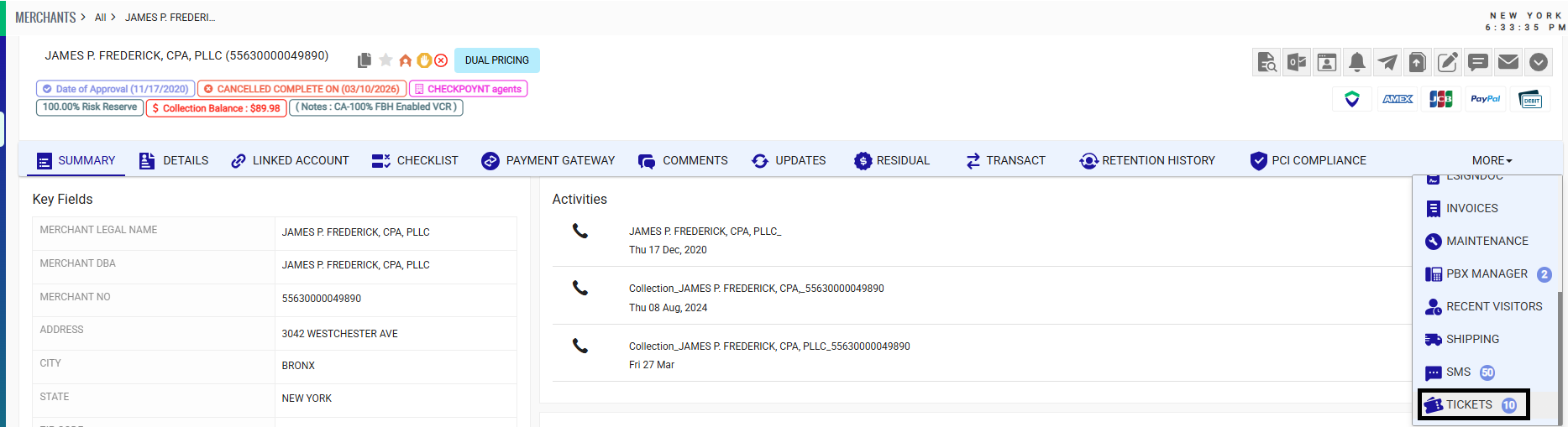
- Close the ticket only when the appropriate action has been completed, such as:.
- Account is being sent to third-party collections.
- Partner/ISO has confirmed to charge their books for the collection balance.
- Balance has been charged off.
Do not close the ticket while additional collection actions or follow-up are still pending.
ISO / Partner Confirmation Requirement (Before Merchant Outreach & Third Party Collection Transfer)
Before contacting the merchant or submitting an account to third-party collections, confirm whether ISO/Partner review is required.
The purpose of ISO/Partner confirmation is to determine whether the collection balance should be charged to ISO/Partner books or if Suede should proceed with merchant collection efforts.
Process:
- Send the “Suede ISO Collection Balance Review Request” canned response.
- Copy the assigned Relationship Manager (RM).
- Advise the ISO/Partner that a response is required within 72 business hours.
- Document all communication attempts and responses in the Collection Ticket.
If ISO/Partner Responds:
- If ISO/Partner confirms Suede should charge their books:
- Follow the ISO Charge to Books process.
- Send the “Suede ISO Charge to Books Confirmation” canned response.
- Document the decision and action taken.
- If ISO/Partner requests merchant collection:
- Proceed with merchant outreach.
- Follow standard collection procedures.
If No Response After 72 Business Hours:
- Document ISO/Partner outreach attempts.
- Proceed with contacting the merchant directly.
Merchant Declines Payment:
Review ISO/Partner liability:
- 51% or higher split: Charge ISO/Partner books based on liability and notify RM.
- Below 51% split: Follow standard third-party collections procedures.
Exception List:
Do not submit the following ISOs/Partners to third-party collections without additional review:
- Mecca
- Promotex
- For Promotex accounts with balances $150 or less, contact Louise at support15@promotex.com and Jeremy at Jeremy@promotex.com for review before submitting to third-party collections.
- Youseff / Mazen Alghaberi (Merchant World) – Secure Card Management
- Hopping Group (Joseph Ferragamo & Raquel Dambrosi)
- NEP
- Universal Processing
- UCG Processing
- Joseph Wilkes
- Bankful
Document all communication and decisions in the Collection Ticket.
Outreach Requirement & Contact Restrictions
Merchant outreach must follow the approved collection process. All outreach attempts must be documented in the Collection Ticket, including:
- Date of contact
- Contact method
- Outcome/details of communication
- Merchant response
- Next steps or follow-up date
Do Not Call (DNC) – Merchant Request Handling (1st Party Collections)
If a merchant requests not to be contacted by phone:
- Document the request immediately in CRM and the Collection Ticket.
- Add account note:
"Merchant requested DNC – No outbound calls." - Stop all outbound phone calls.
- Continue collection activity through approved written communication, including:
- Email communication
- Payment reminders
- Final notices
- Settlement offers, if applicable
A DNC request does not prevent continued collection activity or transfer to third-party collections after internal collection efforts are exhausted.
If transferred to third-party collections:
- Send the "Suede Third-Party Collections-Unable to Reach Merchant – Collections Transfer Notice" email template.
- Document that written communication was used due to the merchant’s DNC request.
- Do not make additional outbound phone calls.
First-Party Collections – Live Calls
Inbound Call Script (Merchant Calling In)
“Thank you for calling Suede, this is [Agent Name]. How may I assist you today?”
“Our records show an outstanding balance of $[Amount] on your account. This balance is related to [brief explanation].”
“I’d be happy to review the available options with you. How would you like to proceed with resolving this balance?”
Outbound Call Script (Live Agent Only)
“Hello, may I speak with [Merchant Name]?”
“Hi [Merchant Name], this is [Your Name] calling from Suede, formerly Merchant Industry.”
“For quality and training purposes, this call may be recorded.”
“I’m reaching out regarding your merchant account. Our records show an outstanding balance of $[Amount] related to [brief explanation].”
“I’m calling today to discuss options for resolving this balance. How would you like to proceed?”
If the merchant declines payment:
“I understand. We will document your decision and continue with the next steps in our collection process.”
Collection Stages
Stage 1: Identification & Initial Outreach (Day 1–10)
Review account history, validate the outstanding balance, and begin merchant outreach.
1st Attempt – Phone Call (Day 1–5)
- Contact merchant regarding outstanding balance.
- Review payment options and attempt to resolve the balance.
- Document call outcome in the Collection Ticket.
2nd Attempt – Phone Call & Email (Day 5–10)
- Complete second phone attempt.
- Send "Suede Outstanding Balance – Payment Reminder" email template.
- Provide payment options and request resolution.
- Document outreach attempts and merchant response.
Stage 2: Formal Collections (Day 10–30)
Continue collection efforts and provide final notice before escalation.
Final Attempt – Phone Call & Email (Day 10–30)
- Complete final outbound phone attempt to discuss the outstanding balance and available payment options.
- If unable to resolve, send "Suede Final Notice Merchant – Outstanding Balance" email template.
- Advise the merchant that continued non-payment may result in additional collection action.
- Allow the merchant an opportunity to respond and resolve the balance.
- Document all outreach attempts, communication outcomes, and next steps in the Collection Ticket.
Stage 3: Payment Resolution & Settlement Review (Day 30–90)
Continue working with the merchant to resolve the outstanding balance through:
- Full payment
- Approved payment plan
- Settlement offer (if eligible)
If payment arrangements are established:
- Monitor payments until the balance is resolved.
- If payment arrangements fail, continue collection efforts.
- Evaluate the account for third-party placement once internal collection efforts are exhausted.
Stage 4: External Collections / Charge-Off (60-90+ Days)
After internal collection efforts have been exhausted:
- Transfer unresolved accounts to third-party collections.
- Send "Suede Third-Party Collections-Unable to Reach Merchant – Collections Transfer Notice " email template.
- Attach the invoice showing the outstanding balance.
- Document transfer details in the Collection Ticket.
Once transferred, payment arrangements must be handled directly with the third-party collection agency.
Charge-Off Guidelines
Accounts with balances under $100 where collection efforts have been exhausted may be charged off as Unable to Collect.
Payment Arrangements & Processing
When a merchant agrees to resolve an outstanding balance through a payment arrangement, follow the approval, documentation, and processing requirements below.
Payment Plan Approval Rules
Payment plans should be structured based on the outstanding balance amount and the merchant’s ability to resolve the balance within a reasonable timeframe.
- Balances under $300: Full payment is expected. Payment plans are not typically offered unless approved by management.
- Balances $300 and above: Payment plans may be considered.
- Payment plans up to 6 months: Agent approval permitted.
- Payment plans longer than 6 months: Manager approval required.
All payment plans must include:
- A reasonable payment amount.
- An expected payoff date.
- Documented approval when required.
Management may require adjustments or additional approval if the proposed payment schedule does not adequately resolve the outstanding balance.
Required Documentation
Document the approved payment arrangement in the Collection Ticket, including:
- Payment schedule:
- Payment amounts
- Payment due dates
- Payment method details
- Signed authorization documentation:
- DocuSign authorization
- Voided check required if a new bank account is being used
Payment Gateway Processing Steps
To process an approved payment:
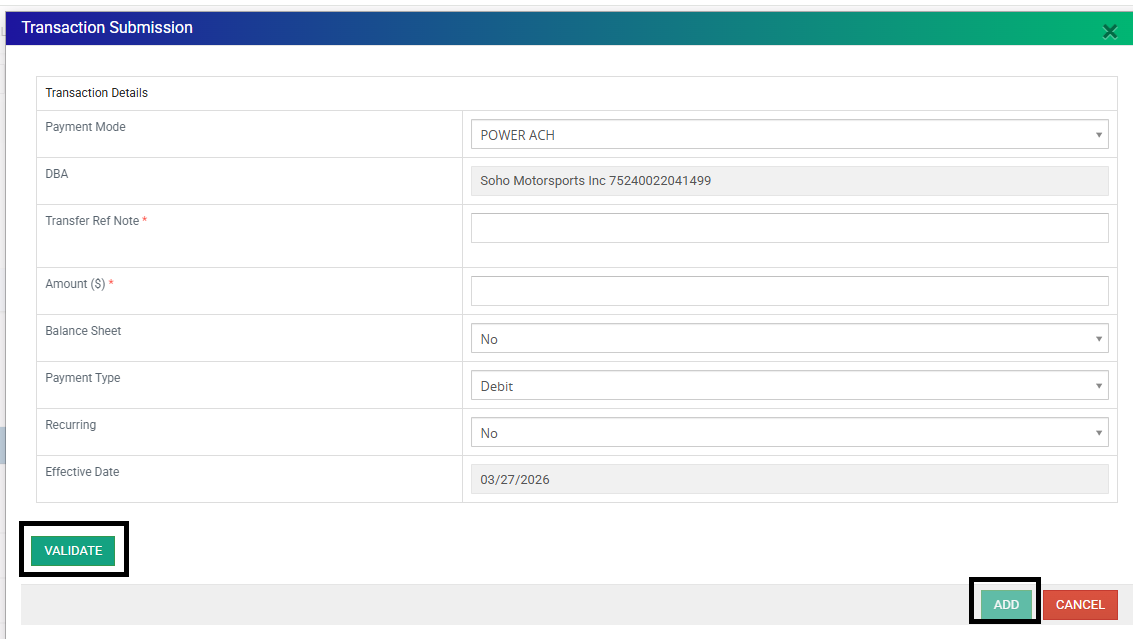
- Navigate to Payment Gateway.

- Select Make Payment.

- Complete the payment details:
- Mode: Select the appropriate payment method
- Power ACH- Bank account payment
- Valor POS- Credit card payment
- Transfer Reference Note: Enter the payment purpose (example: "Payment Plan")
- Amount: Enter the approved payment amount.
- Balance Sheet: Select Yes.
- Type: Debit
- Recurring: Select if setting up a recurring payment plan with consistent payment dates.
- Effective Date: Enter the date the transaction is submitted.
- Mode: Select the appropriate payment method
- Select Validate.
- Select Add.
Important:
Payment status showing as "In Transit" means the ACH payment has been submitted to the bank. CRM payment updates may take approximately 7 business days to reflect. Credit card payments should display as "Successful" immediately after the transaction is processed.
Failed or Missed Payment Arrangements
If a merchant fails to complete an agreed payment arrangement:
- Document the missed payment in the Collection Ticket.
- Continue collection efforts.
- Evaluate the account for escalation to third-party collections once internal collection efforts have been exhausted.
Settlement Offers - Balances $500+
Eligibility
- Account balance $500 or more
- Merchant has not responded to required outreach attempts through phone calls and email
Settlement Rule
- Standard settlement: 80% of outstanding balance
- Example: Outstanding balance = $1,000 → Settlement amount = $800
Manager Approval
- Any settlement requested below 80% of the outstanding balance requires manager approval before committing the offer to the merchant.
Email Template
Suede Settlement Offer – Outstanding Balance Resolution
Requirements
- Send the settlement offer only once per eligible account.
- Settlement payment must be received by the agreed deadline date.
- Stop further outreach once the merchant responds and settlement discussions begin.
- Document all settlement offers, merchant responses, approvals (if required), and agreements in the Collection Ticket.
Third-Party Collections Transfer
Eligibility for Submission
Accounts may be submitted to third-party collections when:
- Outstanding balance is greater than $100.
- Required internal collection efforts have been completed.
- Merchant remains unresolved after required outreach attempts.
- Collection Ticket documentation is complete.
Required Collection Ticket Documentation
Document the following in the Collection Ticket:
- Collection history and outreach attempts.
- Reason for transfer.
- Confirmation that required documents have been uploaded.
- Merchant notification of transfer.
Example Comment:
"Balance over $100 sent to third-party collections. Required documents uploaded. Merchant notified of transfer. Collection Ticket closed."
Accounts Not Eligible for Submission
Balances $100 or Less
Accounts with balances of $100 or less should not be submitted to third-party collections.
Complete the following:
- Update status to Charge Off.
- Close the Collection Ticket.
- Document reason for closure.
Required Comment:
"Merchant unresponsive. Closing Collection Ticket. Balance $100 or less; not eligible for third-party collections."
Additional Requirement
If the merchant has not processed in over 60 days:
- Submit a Close MID Ticket.
- Complete the required account closure process before submitting to third-party collections.
Move Account to Third-Party Collections (CRM Steps)
Required Documentation Before Transfer
Before transferring the account:
- Confirm required documents are available.
- Ensure Collection Ticket notes are complete.
- Confirm merchant notification has been sent.
Attach required documentation:
- MPA
- Invoice showing outstanding balance
CRM Transfer Steps
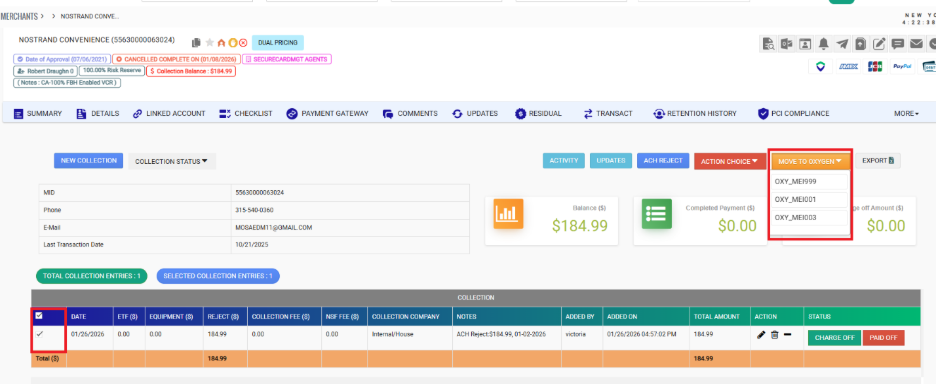
Navigate:
Merchant → Collection → Internal Collection → Move to Oxygen
Select the appropriate Collection Code:
| Processor | Collection Code |
|---|---|
| MI / 7524 | MEI999 |
| TSYS / 9261 & 5563 | MEI003 |
| Promotex / 5845 | MEI004 |
Complete transfer:
- Click Move to Oxygen → verify → click Move to Oxygen again .
- Upload required documents:
- MPA
- Invoice
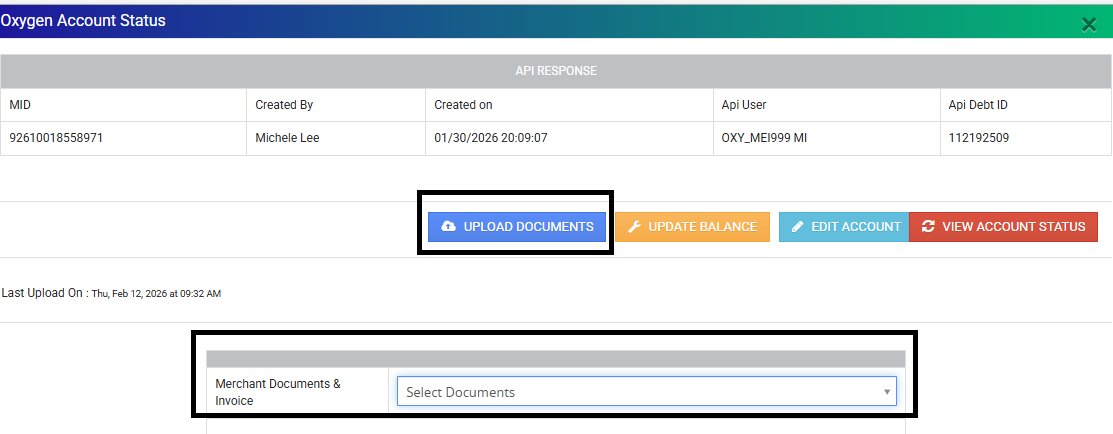
- Confirm submission is complete.
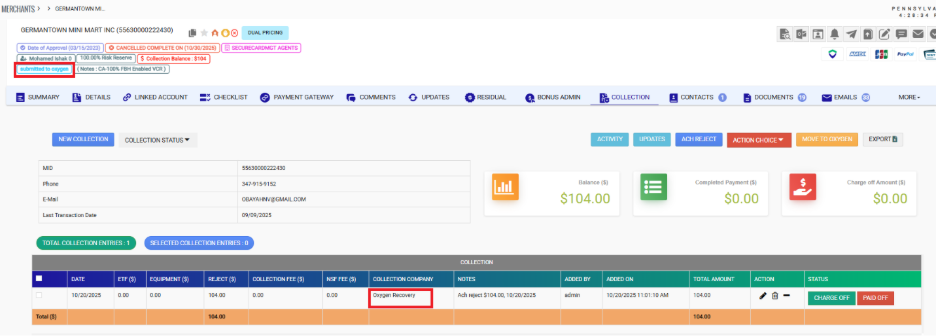
Merchant Notification – Third-Party Collections Transfer
After the account has been submitted to third-party collections, send the merchant notification using the canned response:
Canned Response Template:
Suede Third-Party Collections – Unable to Reach Merchant Transfer Notice
Document the notification in the Collection Ticket:
- Date notification sent
- Canned response template used
Required Collection Ticket Comment for the wheel:
Use:
"Account over 60 days with balance over $100 submitted to Oxygen. Required documents uploaded and merchant notified. Invoice and FD Ticket: [Ticket Number]. Collection Ticket closed."
If Documents Cannot Be Uploaded
If required documents cannot be uploaded through CRM:
Send the required documents directly to the third-party collections provider.
Attach:
- MPA
- Invoice
Use canned response:
Suede Third-Party Collections – Document Submission Request
Document the communication in the Collection Ticket.
After submission:
- Close the Collection Ticket.
- Document transfer details.
Accounts Not Eligible for Third-Party Collections
Balances $100 or Less
Accounts with balances of $100 or less should not be submitted to third-party collections.
Complete the following:
- Update account status to Charge Off.
- Close the Collection Ticket.
- Document reason for closure.
Required Comment:
"Merchant unresponsive. Closing Collection Ticket. Balance $100 or less; not eligible for third-party collections."
Additional Requirement
If the merchant has not processed in over 60 days:
- Submit a Close MID Ticket.
- Complete the required account closure process before submitting to third-party collections.
Post-Third-Party Collections Handling
Once an account has been transferred:
- Direct the merchant to the collection agency for payment arrangements.
- Suede should not accept payments after transfer.
- Payment questions should be directed to the assigned collection agency.
Oxygen / Altus Transfer Information
Oxygen
- Contact Number: 845-367-4330
Altus
- Contact Number: Pending confirmation from Altus
Warm Transfer Verbiage:
"Your account has been transferred to our collections partner for payment assistance. I will connect you with their team now."
Was this article helpful?
That’s Great!
Thank you for your feedback
Sorry! We couldn't be helpful
Thank you for your feedback
Feedback sent
We appreciate your effort and will try to fix the article