Purpose
Ensure Suede’s collections process is professional, compliant, and efficient, using live calls, messages, settlements, and third-party escalation to engage merchants regarding outstanding balances while protecting sensitive information.
Authentication / Account Verification (Inbound & Outbound)
Confirm the caller is authorized to discuss the account before sharing any balance or payment information.
Procedure:
- Ask for Merchant Name.
- Confirm the individual calling is associated with the account.
- Ask for a Secondary Identifier (one or more, if applicable):
- Last 4 digits of EIN/SSN
- Business address on file
- Phone number on file
- Only proceed with balance discussion after confirming identity.
- If the caller cannot authenticate, do not discuss the account.
- Log the attempt in the system .
Reference:
For full guidance on authentication procedures, see Suede Authentication Guide.
Collections Report Workflow (Ticket & CRM Process)
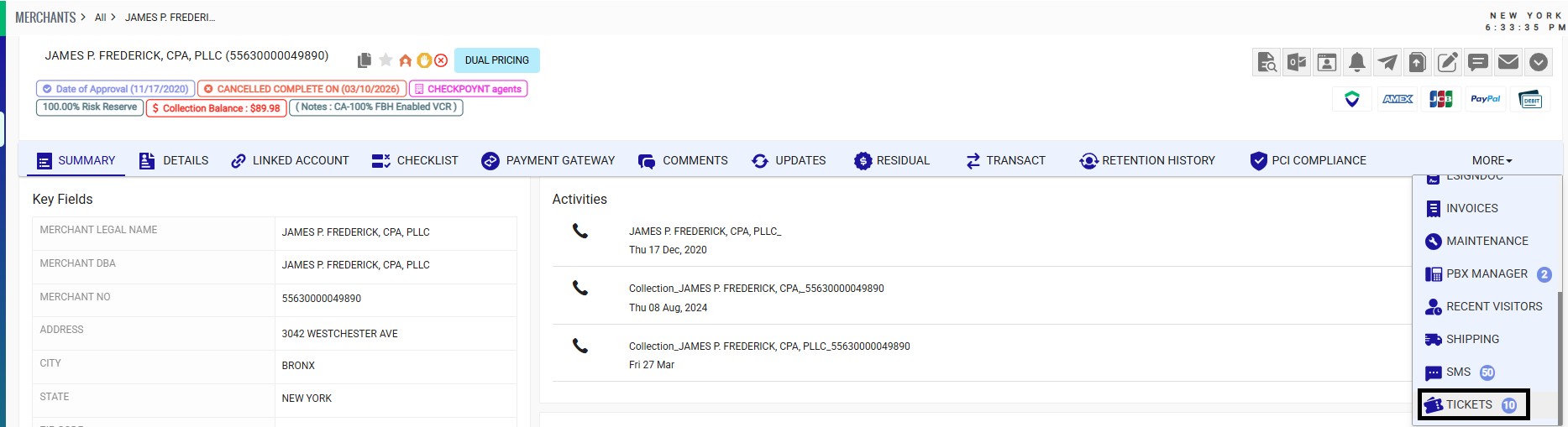
Navigate to the Ticket module.
- Click RPT to open the Collections Report.
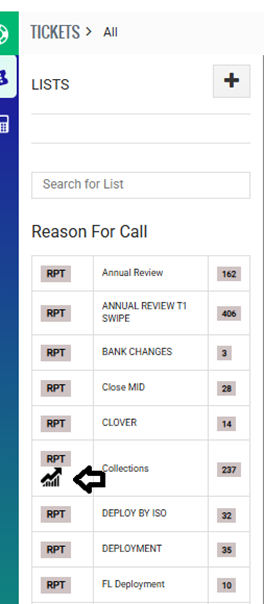
- Apply filter:
- Set Collection Company = Internal/House
- Set Create Date = 1/1/2025- to date
- Click Search.

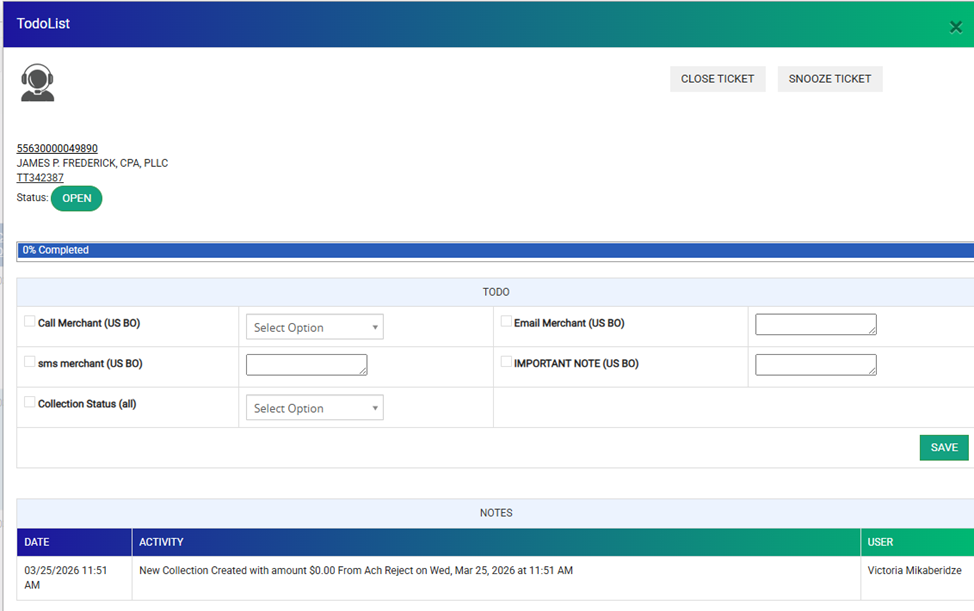
- Under the To Do column, click inside the wheel icon.

- Update the section based on the action being taken. Add notes always under "important notes". DO NOT TOUCH COLLECTION STATUS
- Click Save once complete.
- Activity will automatically display after saving.
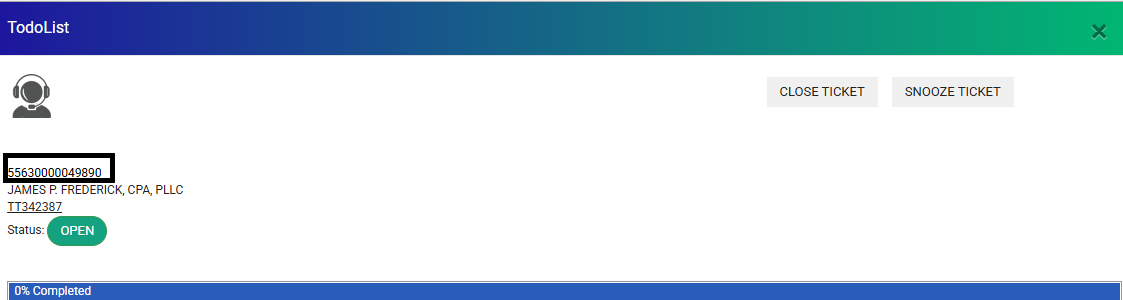
- Click the MID to open the merchant account.
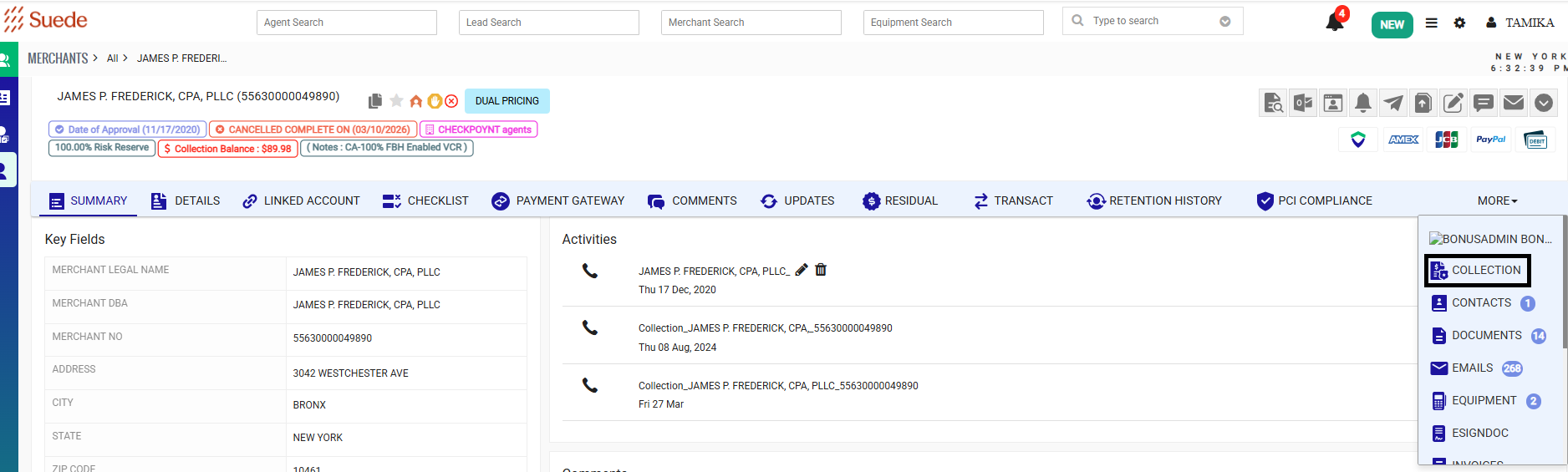
- Navigate to the Collection Module within the account and update accordingly.
- Return to the Ticket and confirm:
- Notes added via the wheel are visible
- Ticket is updated properly
- Ticket is closed when the process is complete
Outreach Requirement
- Make three contact attempts: Call, SMS, and Email. (If SMS feature is not working please make 2 call attempts)
- Allow 7-business-day response window after the final email attempt.
- Document all outreach attempts in the Collection Ticket, including date, method, and outcome.
- Future automation: Any SMS, email, or settlement offer sent automatically should also create or append a comment in the Collection Ticket for proper tracking.
Contact Flow / Timing Recommendation
| Attempt | Method | Timing | Notes |
|---|---|---|---|
| Outbound Call | Day 1 | Manual call to discuss balance and ask how to pay. | |
| SMS Reminder | Day 2-3 | Manual for now; short, neutral reminder with secure link. Future automation planned. | |
| Email Reminder | Day 4-5 | Manual for now; formal notice, secure portal link, 7-business-day response. Future automation planned. | |
| Settlement Offer | After Day 7 (if no response) | Manual; only for balances ≥ $500, 80% standard, manager approval if <80%. Future automation planned. |
First-Party Collections – Live Calls
Inbound Call Script (Merchant Calling In)
“Thank you for calling Suede, this is [Agent Name]. How may I assist you today?”
“Our records show an outstanding balance of $[Amount] on your account. This balance is related to [brief explanation].”
“How would you like to make the payment today?”
Outbound Call Script (Live Agent Only)
“Hello, may I speak with [Merchant Name]?”
“Hi [Merchant Name], this is [your name] calling from Suede, formerly Merchant Industry.”
“For quality and training purposes, this call may be recorded.”
“I’m reaching out regarding your merchant account. Our records show an outstanding balance of $[Amount], related to [brief explanation].”
“I’m calling today to see how you’d like to handle this balance.”
Do Not Call (DNC) – Merchant Request Handling (1st Party Collections)
If a merchant requests not to be contacted (Do Not Call):
- Document the request in CRM/Collection Ticket immediately
- Add account note: “Merchant requested DNC – no outbound calls”
- Stop all outbound calls
- Continue normal account handling and escalation process if applicable (DNC does not prevent third-party transfer)
- If the account is transferred to third-party collections, notify the merchant via written communication only (no phone call outreach)
- Document that notification method was adjusted due to DNC status
First-Party Collections – Voicemail Script (Outbound Only)
Voicemail Script (General – No Account Details):
“This is message is for [merchant name] My name is [agent name] calling from Suede regarding your merchant service account for [DBA NAME]. Please return my call at 866-811-1005. Thank you.”
Agent Notes:
- Engage merchant first — confirm it’s a good time to talk.
- Keep conversation neutral, factual, and compliant.
- Document call outcome (answered, voicemail, call back requested).
Manual Outreach (SMS / Email)
SMS – Day 2-3
Note: Currently sent manually by agents; future automation planned.
“Dear $accounts-cf_780$, Please be advised that there is outstanding balance of $colldue$ with Suede. Please contact us at (866)-811-1005. Thank you”
Email – Day 4-5
Note: Currently sent manually by agents; future automation planned.
Email template: Suede Outstanding Balance – Initial Notice
Settlement Offer – Balances $500+
Note: Currently sent manually by agents; future automation planned for eligible accounts.
Purpose: Provide a factual way for eligible merchants to resolve their account.
Eligibility:
- Account balance $500 or more
- Merchant has not responded to SMS or email
Settlement Rule:
- Standard settlement: 80% of outstanding balance
- Example: Outstanding balance = $1,000 → Settlement = $800
Manager Approval:
- Any settlement requested below 80% of the balance requires manager approval before committing.
Email Template: Suede Settlement Offer – Balance Resolution
- Only send once per eligible account.
- Stop further outreach once the merchant responds.
- Document all responses and settlement agreements in the Collection Ticket.
Payment Arrangements
Merchants may request to pay outstanding balances over time.
Setup Guidelines:
Duration / Payment Limits:
- Payment plans over 6 months require manager approval.
- Payment plans 6 months or less can be set up directly by the agent.
- For balances under $300, merchants may have up to 3 payments maximum.
Documentation:
- Record all payment arrangements in the Collection Ticket.
- Include: payment amounts, dates, and the payment method(s) being used.
- When sending the “Payment Arrangement Template” canned response, remove any payment methods that are not applicable to the merchant before sending the email.
New Bank or Credit Card Information:
- If a merchant provides new checking or credit card information:
- Collect the signed DocuSign agreement and a voided check (for checking accounts).
- Send the documents to the Accounting team at neilc@merchantindustry.com.
- Accounting will process the payment once received.
- If the merchant is paying with a checking account already on file, the payment can be debited directly from the Payment Gateway.
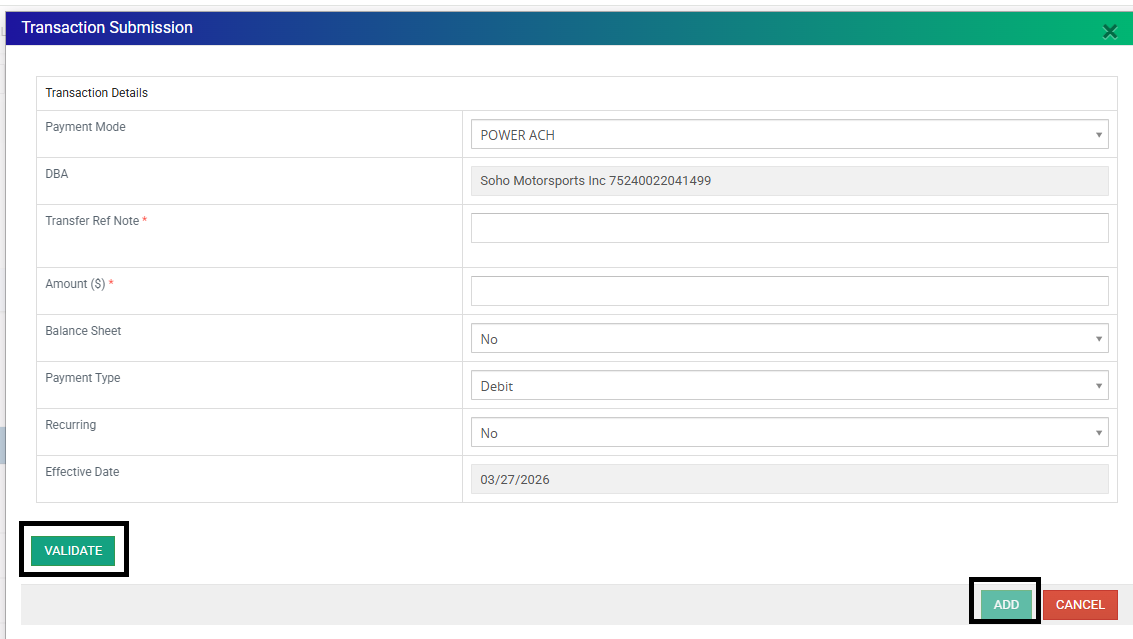
- Navigate to Payment Gateway

- Click "Make Payment"

- Complete the Transaction details:
- Payment Mode: Power ACH
- Transfer Reference Note: (e.g., “Payment Plan”)
- Amount: Enter the payment amount
- Balance Sheet: Select “Yes”
- Payment Type: Debit
- Recurring: Select if setting up a recurring plan with consistent dates
- Effective Date: Date the transaction is submitted
- Click Validate, then Add
 Important Notes
- Once submitted, the payment is sent to Accounting for processing.
- “In Transit” status means the payment has already been sent to the merchant’s bank.
- The CRM will not show the payment as “Settled” until approximately 7 business days, even though the merchant may have already received the funds.
- This delay ensures the payment does not reject at a later date.

- Navigate to Payment Gateway
Future Automation:
- Logging and manager approval workflows may be automated in the future to streamline the process.
Third-Party Submission (Oxygen)
Eligibility for Submission:
- Balance > $100
- Merchant is unresponsive after 3 outreach attempts (call, SMS, email)
- Collection Ticket fully documented: "Balance over $100 send to Oxygen, uploaded documents - Emailed merch sent to Oxygen. Closed Collection Ticket."
Do NOT send:
- Balance ≤ $100 → Status should be "Charge Off" Close Collection Ticket and document:
“Merchant is not responsive – Closing Collection Ticket. Unable to send to Oxygen because balance ≤ $100."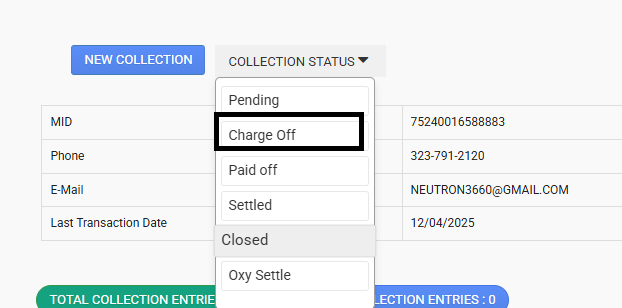
Additional Requirement:
- If the merchant has not processed in over 60 days, submit a Close MID Ticket and complete the procedure before submission.
ISO Confirmation Requirement
Before submitting accounts from the following ISOs to Oxygen and creating CLOSE MID tickets, confirm with the ISO whether their books should be charged for the collection balance and whether a CLOSE MID ticket should be submitted due to the account being inactive for over 60 days.
- Attempt to obtain ISO confirmation twice.
- If there is no response after two attempts, contact the merchant directly.
- If the merchant refuses to pay:
- Check ISO split percentage:
- 50% or higher → Charge the ISO’s books and send an email using the Freshdesk canned response: “Charge Collection to ISO ___ Books.”
- Under 50% → Follow standard procedures to submit the account to Oxygen.
- Check ISO split percentage:
- Document all steps and communication in the Collection Ticket.
- Ensure all actions and approvals are documented prior to moving the account to Oxygen.
Promotex Collection Handling:
For Promotex accounts, if the outstanding balance is $150 or less, reach out to Louise at support15@promotex.com for review before submitting to Oxygen, as the balance may be eligible for write-off. Ensure all communication and decisions are documented in the Collection Ticket.
Direct Sales FL & NYC ISOs Requiring Confirmation:
- Mecca
- Act Merchant Corp [3978]
- Promotex
- Youseff / Mazen Alghaberi (Merchant World) – Secure Card Management
- Hopping Group (Joseph Ferragamo & Raquel Dambrosi)
- NEP
ISO confirmation must be documented in the Collection Ticket prior to transfer.
Moving the Account to Oxygen (CRM Steps)
- Navigate: Merchant → Collection → Internal Collection → Move to Oxygen
- Select Collection Code:
| Processor | Code |
|---|---|
| MI/7524 | MEI999 |
| TSYS/9261 & 5563 | MEI003 |
| Promotex/5845 | MEI004 |
- Click Move to Oxygen → verify → click Move to Oxygen again
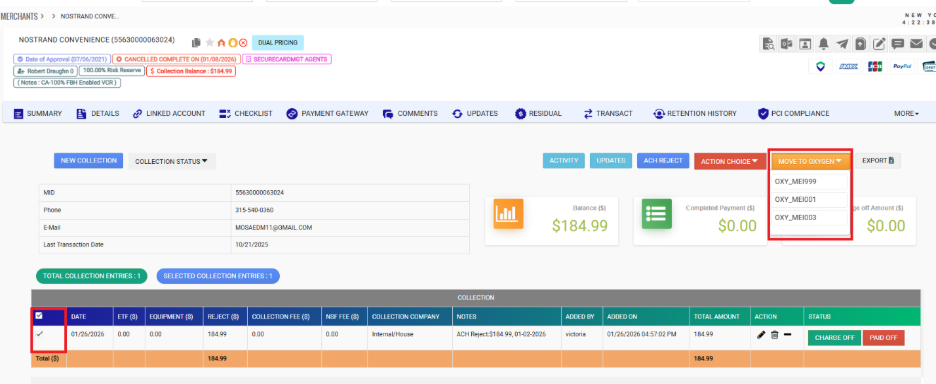
- Upload required documents: Click move to Oxygen→ Upload→ MPA + Invoice.
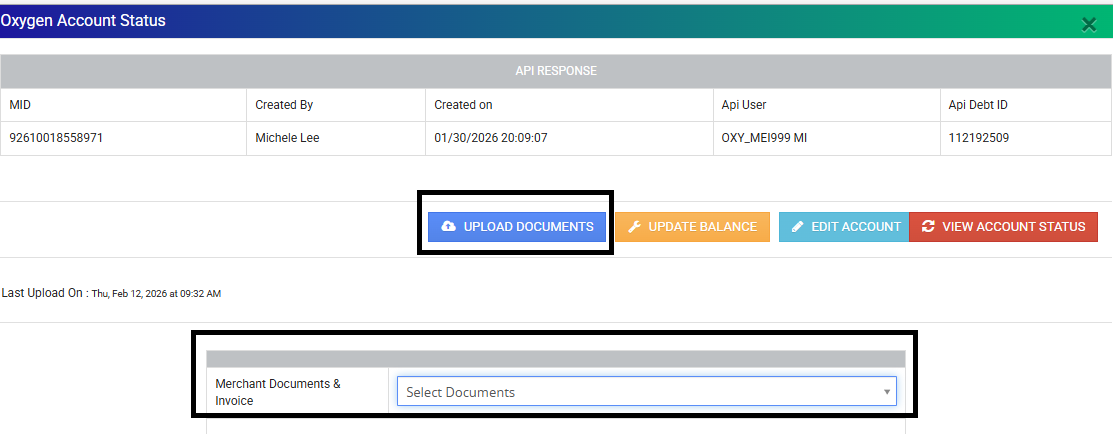
- Submission confirmation
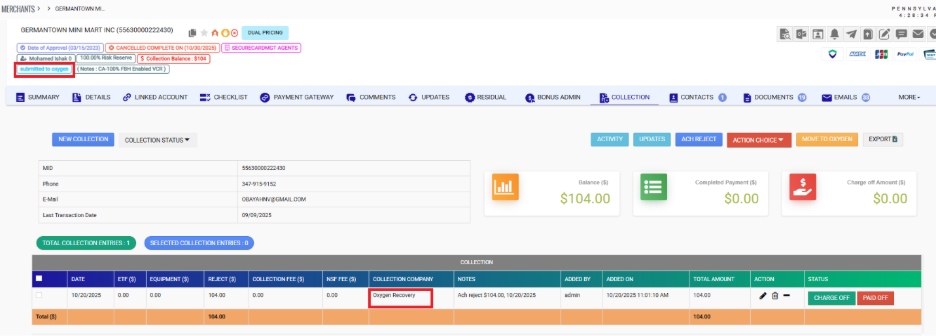
- Submission confirmation
Once documents are uploaded and transfer is complete, close the Collection Ticket.
Required Comments:
Comment for To Wheel:
"Any account over 60 days and with a balance over $100 has been sent to Oxygen. All required documents were uploaded and the merchant was notified via email, attached invoice FD ticket- . The collection ticket has been closed."
Template: Suede – Notice of Transfer to Third Party Collections – MID: [MID] | DBA: [DBA]
Attach invoice
If Documents Cannot Be Uploaded
Email Oxygen directly with the MPA and Invoice attached.
Subject:
Merchant Business Name (MID)- Documents & Fees
Email Body:
Hello,
The collection balance of $_______ is for an ACH rejected related to ____________ fees.
Please review attached documents for [Merchant Name].
Thank you,
After emailing, close the ticket.
Merchant Payments After Transfer to Oxygen
Once a merchant account has been transferred to Oxygen:
- Merchants should be directed to contact Oxygen directly to make any payments on their account. Contact number 845-367-4330.
- If a merchant insists on paying Suede directly, the payment may be accepted and must be processed accordingly.
If payment is accepted by Suede:
- Confirm payment is fully settled in Suede’s system.
- Ensure the ISO is charged in the books.
- Document all payment details in the Collection Ticket.
- Email Oxygen to request account removal/update of payment status.
Send notification to:
Include in the email:
- Merchant MID
- Payment confirmation details
- Note that the merchant was informed to contact Oxygen for future payments
Merchant Notification Requirement (Post-Oxygen Transfer):
Merchants must be advised that all future payments should be made directly to Oxygen after the transfer is complete.
Send an email notification to the merchant via Freshdesk.
Use the designated Canned Response for third-party collections notification.
Subject: Account Sent to Third-Party Collections – {MID}
Document that the email was sent in the Collection Ticket.
Was this article helpful?
That’s Great!
Thank you for your feedback
Sorry! We couldn't be helpful
Thank you for your feedback
Feedback sent
We appreciate your effort and will try to fix the article