This guide walks you through how Split Funding is set up, reviewed, and maintained for TSYS-boarded merchants, and explains what each of the key fields on the screens below are for. Screens appear in the order they occur in the workflow.
What Split Funding does
Split Funding lets a merchant's daily settlement be automatically divided across more than one bank account. Instead of the full settlement landing in the primary DDA, TSYS distributes portions of it to the additional accounts you configure, and the remainder settles to the primary account.
Rules to know before you configure it:
- Up to four (4) additional bank accounts can be configured, not including the merchant's main/primary bank account.
- Each split is defined as either a percentage (%) of settlement or a fixed dollar amount — use one method or the other, not both.
- If a fixed amount is greater than that day's settlement amount, no funds are distributed to that DDA for that day. The split is skipped, not partially funded.
- A monthly recurring Split Funding fee applies per MID configured (see Step 2).
- Split Funding is only available for TSYS-CBCAL Merchants boarded through Suede.
Step 1 — MPA Tool: Owner and Banking Details
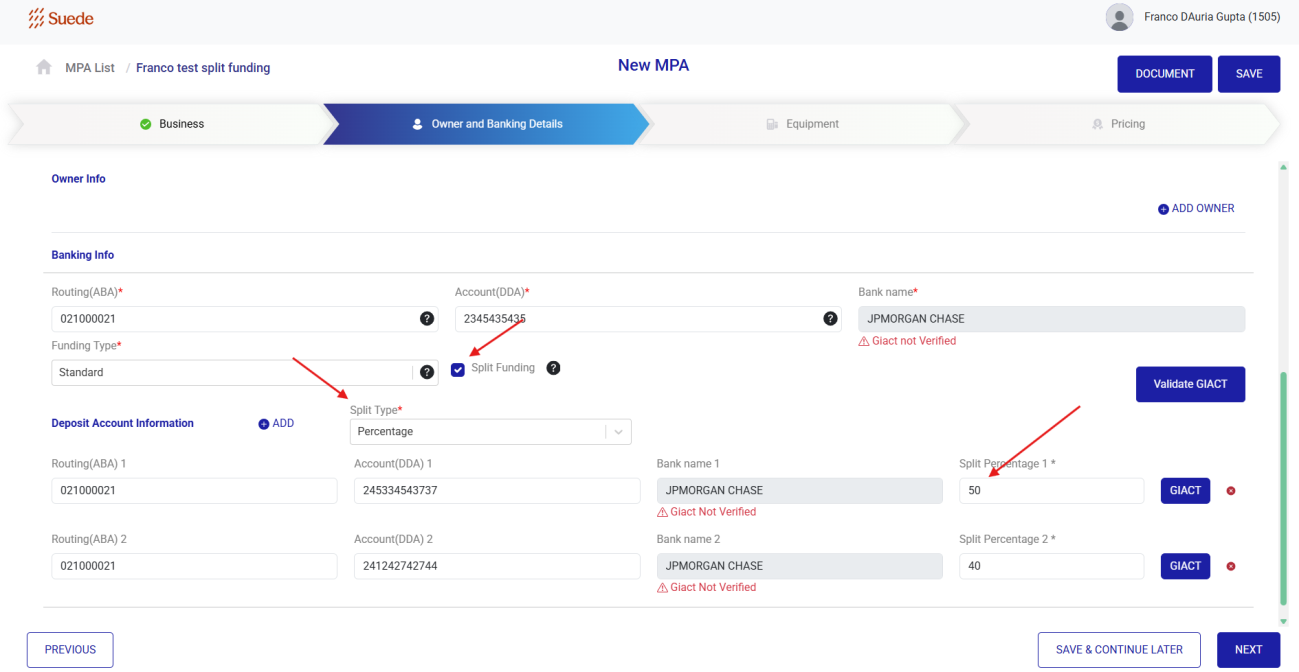
The merchant application is created in the MPA tool. On the Owner and Banking Details step, the primary banking information is entered first, then Split Funding is enabled and the deposit accounts are added.
| Field | What it does |
|---|---|
| Routing (ABA) / Account (DDA) / Bank name | The merchant's primary settlement account. This account receives whatever remains after the configured splits are distributed. It does not count toward the four split accounts. |
| Split Funding (checkbox) | Turns Split Funding on for this application. Checking it enables the Split Type selector and the Deposit Account Information section below. |
| Split Type | Determines how every split is calculated — Percentage (% of settlement) or a fixed dollar amount. Set this before entering the accounts, as it drives which column you complete. |
| Split Percentage 1–4 (or Split Amount) | How much of settlement goes to that account. With Percentage, enter the percent value (e.g. 50 and 40). With a fixed amount, enter the dollar figure — and remember, if it exceeds the day's settlement, that account is not funded that day. |
| GIACT / Validate GIACT | Runs bank account verification on the account. “Giact Not Verified” is a warning flag for underwriting review — it identifies accounts that have not yet been validated. |
Step 2 — MPA Tool: Pricing page
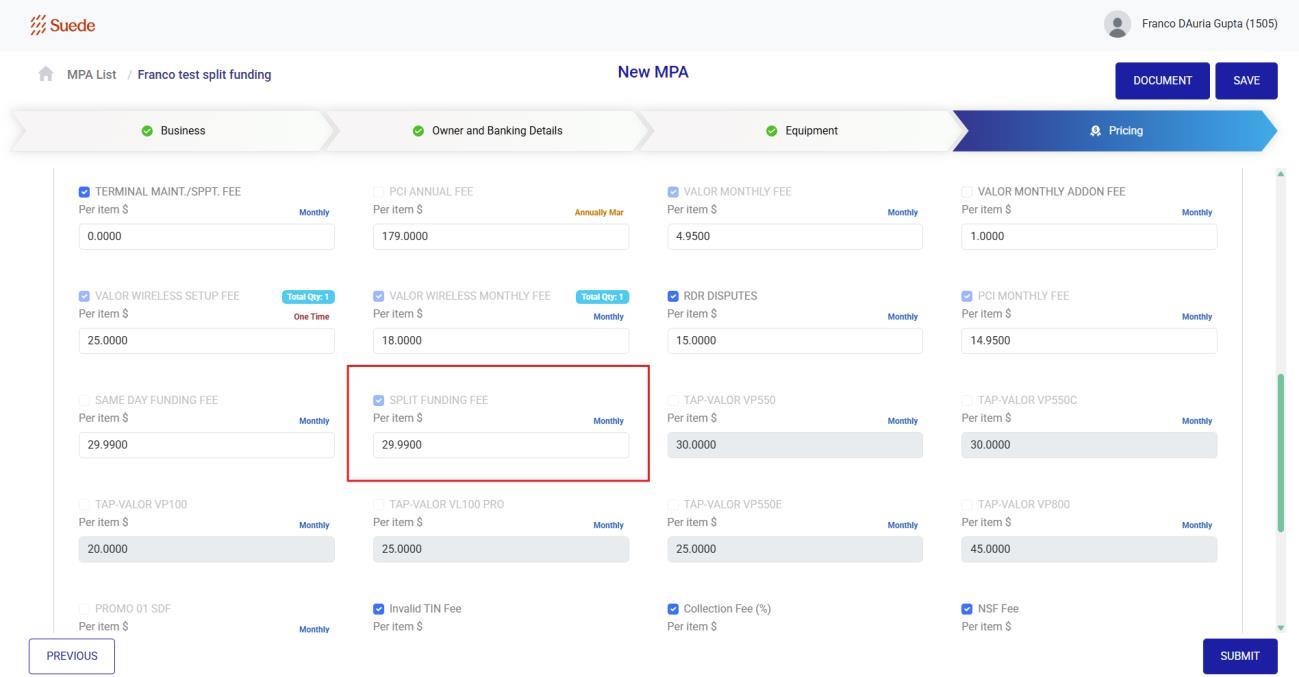
Once Split Funding is enabled, the recurring fee appears on the Pricing step so it can be reviewed and, where applicable, adjusted before submission.
The fee can be adjusted by the ISO if it is configured to be editable via the merchant pricing template. Note: the fee is currently editable by the ISO.
Step 3 — Generated MPA PDF: Split Funding Addendum
When the MPA tool generates the application PDF, the Split Funding configuration is carried into the Split Funding Addendum. This is the merchant-facing record of what was set up and what they are agreeing to.
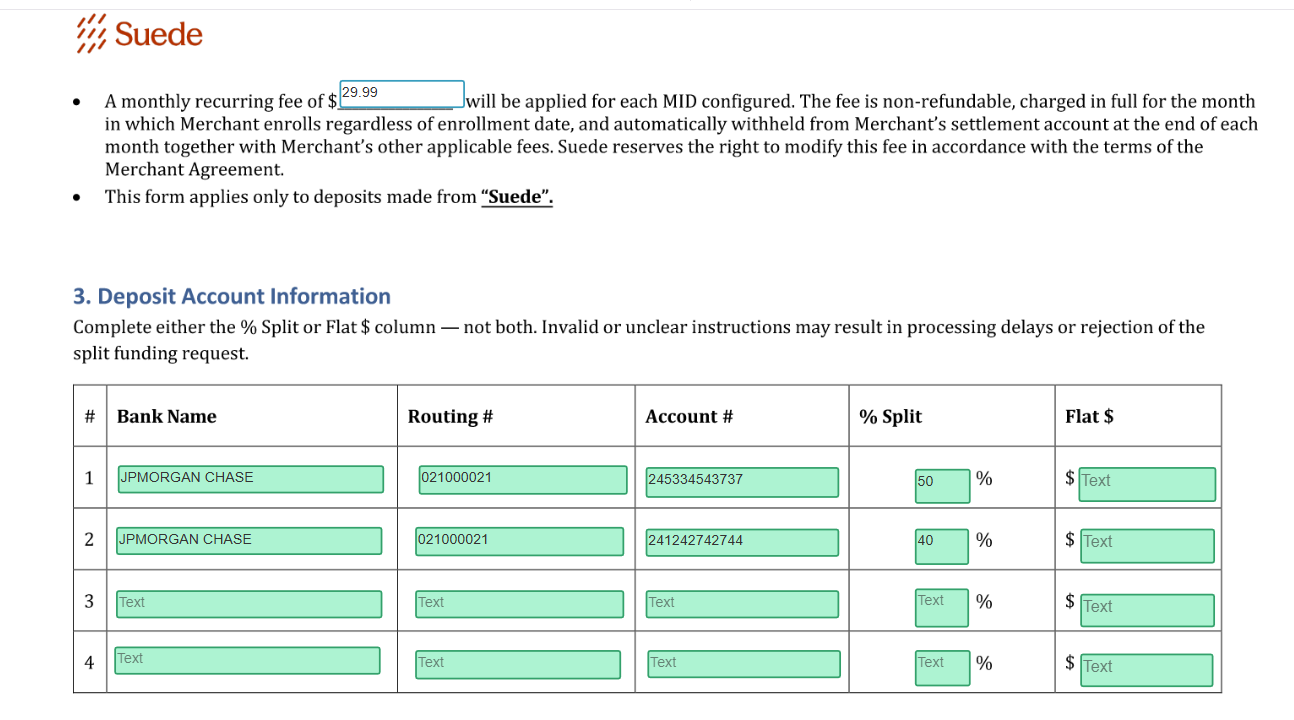
| Important: Complete either the % Split column or the Flat $ column — never both. Mixed or unclear instructions may delay processing or cause the split funding request to be rejected. |
Step 4 — CRM: Underwriting record
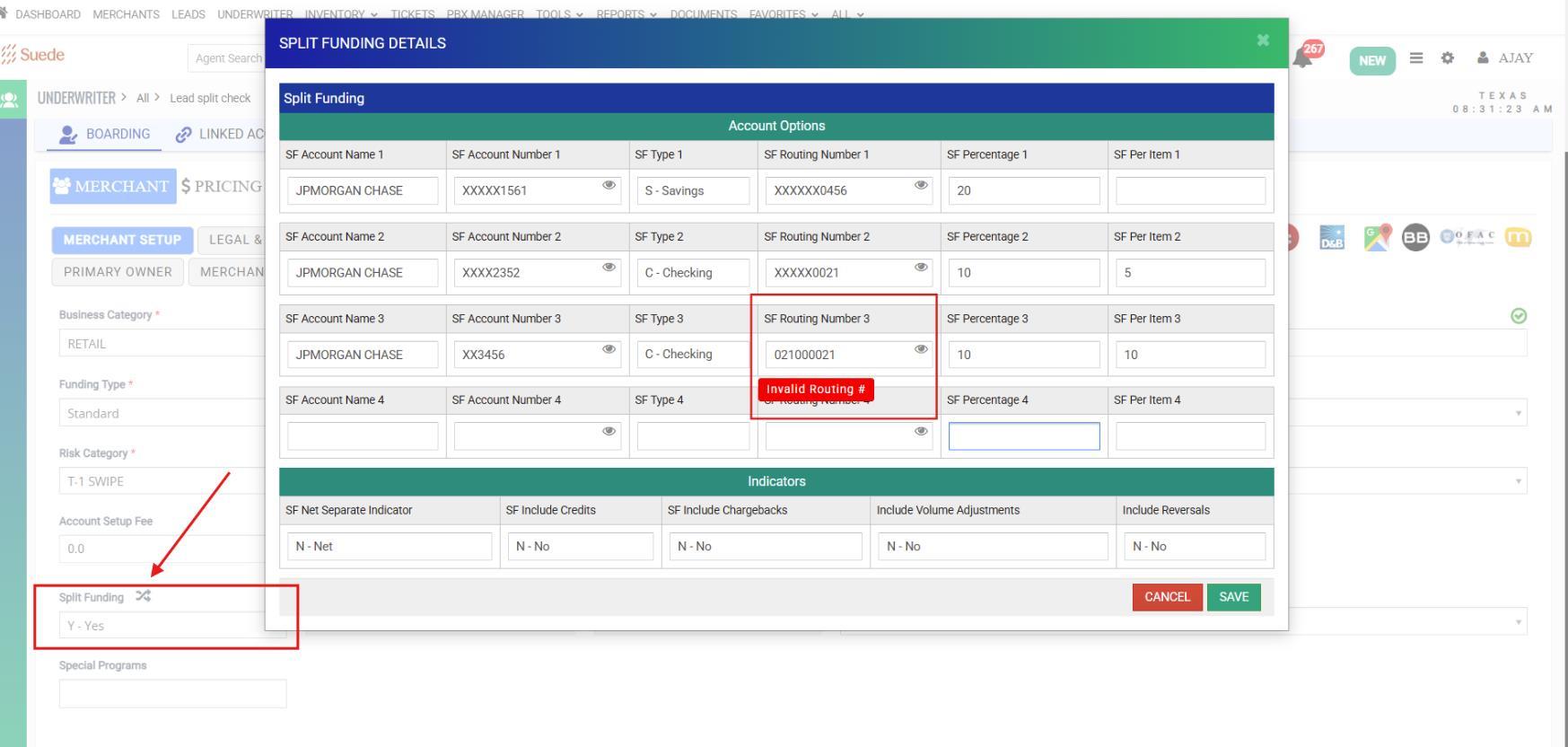
The Split Funding fields flow into the CRM on the Underwriting record, where the underwriting team can review and adjust them before the merchant is boarded. Open the Split Funding Details window from the Split Funding button on the Merchant Setup tab.
Step 5 — Post-boarding: Maintenance page
After the merchant is boarded, Split Funding can still be adjusted from the merchant's Maintenance page. Changes made here sync to TSYS CBOS.
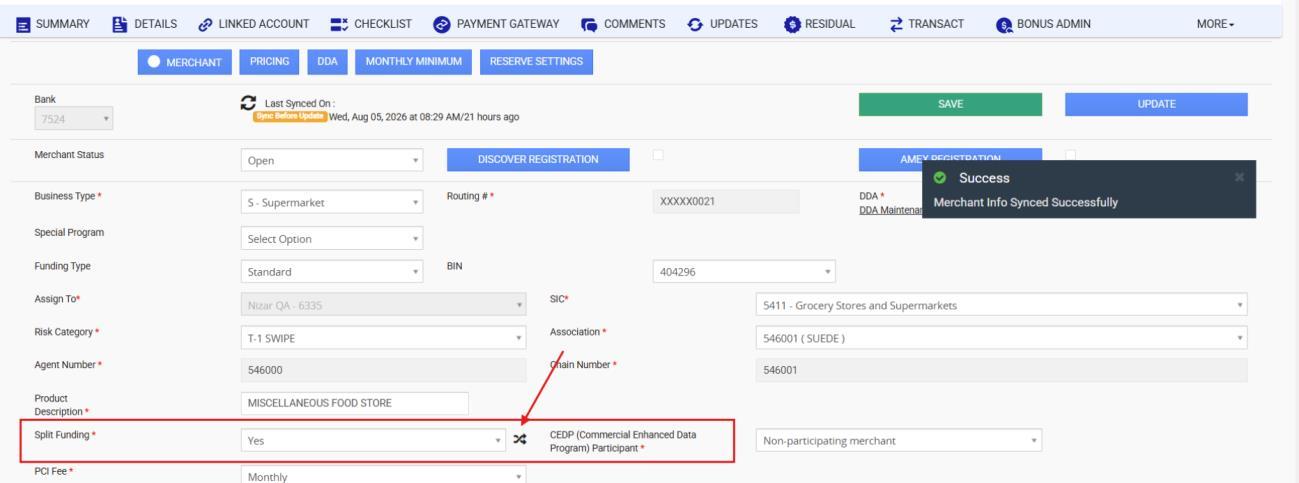
| Field | What it does |
|---|---|
| Split Funding (Yes / No) | Enables or disables Split Funding on a boarded merchant. The shuffle icon opens the same Split Funding Details window described in Step 4 so the accounts, percentages, and indicators can be edited. |
| SAVE / UPDATE | Save button stores the change in the CRM; the Update button pushes the merchant record to CBOS. |
| Note: There is currently no bank approval workflow for the Split Funding fields — edits made on the Maintenance page sync to TSYS without a review/approval step. Any user that has access to the maintenance module will be able to update the split funding DDA and related fields. This workflow is in development and will be available in an upcoming release. Until then, treat post-boarding split funding changes as high-touch and get manual approval before making changes. |
Step 6 — Verifying in TSYS CBOS
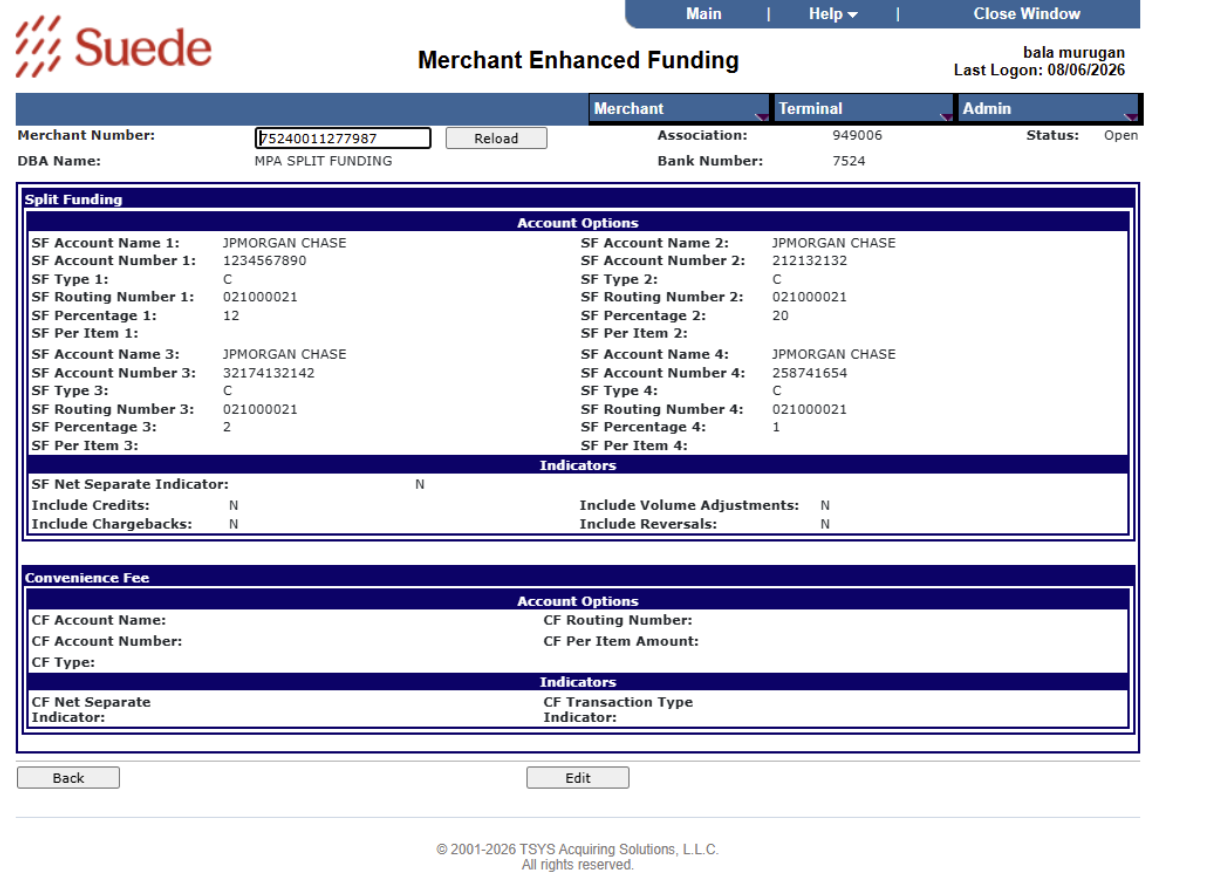
To confirm what TSYS actually has on file, view the merchant in CBOS under the Merchant Enhanced Funding screen. You can update the DDAs and related fields directly in CBOS. However, it is highly recommended that changes are made from the CRM only, as that is where the full merchant life cycle audit trail and approval process are happening.
Split Funding — Settlement Data Delivery
To support partners running their own downstream platforms, Split Funding settlement data can be delivered externally. Two delivery methods are supported: a push to an AWS S3 bucket, or a drop to an SFTP mailbox. The file is sent daily and contains a filtered portfolio-level view. It includes each applicable MID along with its associated split funding DDAs, showing what was funded, to which account, and on what date.
Future Enhancements
Two enhancements to Split Funding are in development. Neither is live today; this section is for awareness so teams can plan around the current gaps.
Split Funding bank change approval workflow
Today, edits to the Split Funding bank fields on the Maintenance page sync to TSYS CBOS without any review step — whoever has access to the record can change a receiving account and push it. The upcoming release adds a formal approval workflow for these changes: a bank-account edit will be held in a pending state, routed for review, and only synced to TSYS once approved. There will be an audit trail of who requested the change, who approved it, and when.
Split Funding fields added in the MPA API
The Split Funding fields are currently entered manually in the MPA tool. They will be added to the MPA API so an external application can push a complete split funding configuration — account name, routing, DDA, account type, split type, and percentage or flat amount for each of the four accounts — directly onto an MPA.
Was this article helpful?
That’s Great!
Thank you for your feedback
Sorry! We couldn't be helpful
Thank you for your feedback
Feedback sent
We appreciate your effort and will try to fix the article