Communications Please ensure all communications regarding Circular Payments are sent to: |
1. Device Billing Process
The table below outlines the end-to-end device billing workflow, including the responsible party for each step.
| Step | Action | Owner |
|---|---|---|
| 1 | Create the invoice using Net 30 terms (i.e., bill against residuals). | Tech Support Manager |
| 2 | Invoices greater than $500 are routed for 2nd approval. Residual checks are not required for these invoices. | Tech Support Manager |
| 3 | At month end, send the monthly invoice details to Relationship Manager: Wayne Lukaszewski. | Finance |
| 4 | Obtain Agent approval for the invoice and communicate the approval back to Finance (Owen) and Tech Support Manager (Adam). | Relationship Manager |
| 5 | Charge the credit card and confirm back to Relationship Manager and Finance (Owen). | Tech Support Manager |
| 6 | Adjust Agent residuals with a credit for the credit card payment. | Finance |
2. Merchant Batch / Cut-Off Time
All merchants are to be set with a 10:30 PM ET batch cut-off time, unless otherwise specified in the merchant's account setup or agreement.
3. Next Day Funding
Please ensure all Circular accounts are on Next Day Funding unless specifically instructed otherwise by Underwriting, or if the client selects Same Day Funding.
4. Shipping
Express Shipping on all device orders.
5. Split Funding
Circular Interim Solution & Steps
Only if you choose not to input the full DDA account in the MPA Tool within the CRM:
- When completing the MPA in the CRM, continue to choose Split Funding, Add Account, and enter the routing number and bank account number with the 0's in front, plus the % allocation.
- There is no need to complete and upload a second, separate split addendum form.
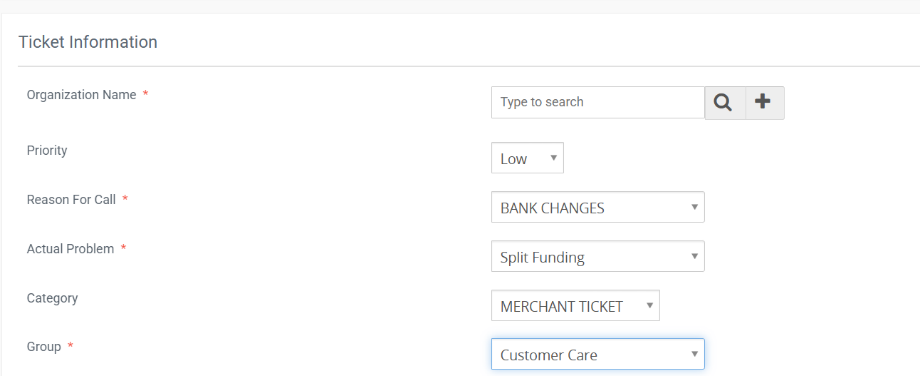
- Open a ticket that includes the correct routing number and Circular DDA number, and request that the Split Funding account info be updated once the account is approved.
Ticket field values:
| Field | Value |
|---|---|
| Reason For Call (RFC) | Bank Changes |
| Actual Problem | Split Funding |
| Category | Merchant Ticket |
| Group | Customer Care |
| Priority | Low |
Reference screenshot of the ticket fields:
Internal Suede Team
Approximately 99% of Circular's merchants are set up with Split Funding. To support this:
- Ensure every account has Split Funding selected.
- Confirm the split funding information on file is correct and current.
- Confirm the percentage allocation is accurate for each account.
Was this article helpful?
That’s Great!
Thank you for your feedback
Sorry! We couldn't be helpful
Thank you for your feedback
Feedback sent
We appreciate your effort and will try to fix the article