1. TEST DEVICE
Test device in MI office to confirm functionality.
If the device is defective and in warranty, start the RMA process.
If the device matches one of the descriptions below, the device cannot be RMA’d, even if it is in warranty.
Physical damage
Water damage
Cracked screen
2. VALOR RMA REQUEST FORM
https://docs.google.com/forms/d/e/1FAIpQLSdKMQp0EYgaMHeqvBiwsUZPQBGnLDq27gFzmU_QezyPc6AhRA/viewform
For each Valor RMA, the Valor Paytech RMA Request Form must be completed.
It should match this example for a tampered VP100.
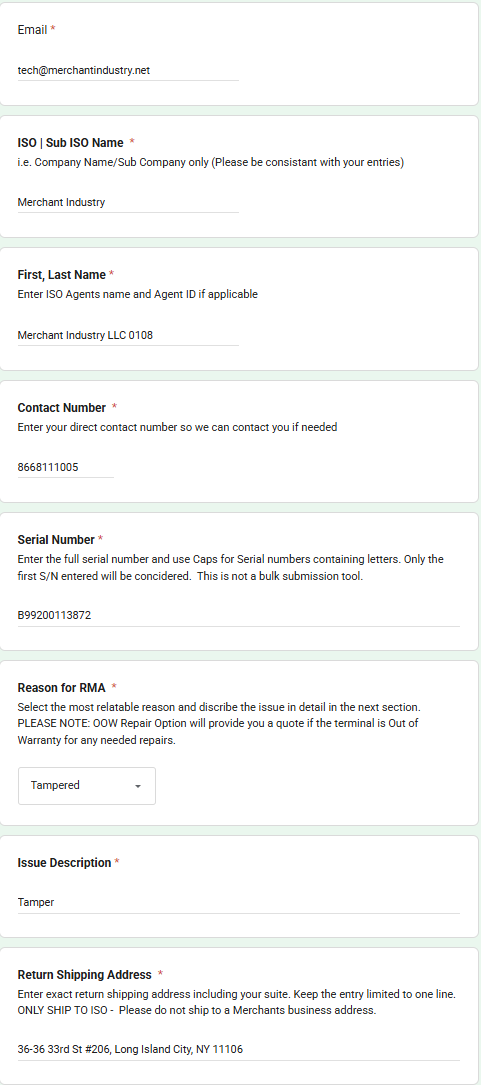
Email: tech@merchantindustry.net
ISO | Sub ISO Name: Merchant Industry
First, Last Name: ISO name and agent code
Contact Number: 866-811-1005
Serial Number: SN of terminal
Reason for RMA: Choose the dropdown option that most closely matches the issue
Issue Description: Brief description of terminal fault
Return Shipping Address: 36-36 33rd St #206, Long Island City, NY 11106
Select “Submit” once completed.
3. RMA INVOICE
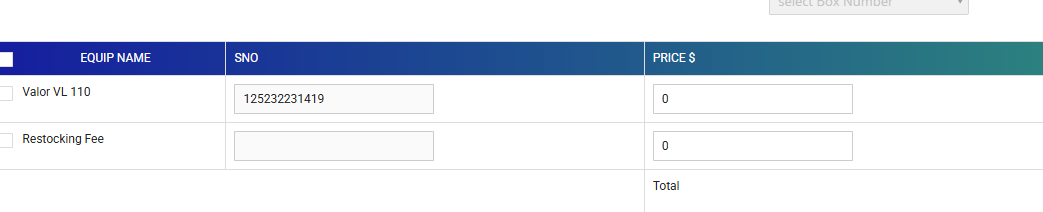
Create a return invoice for the serial number.
Ensure the equipment price and restocking fee are set to $0.00 as seen below, then save.
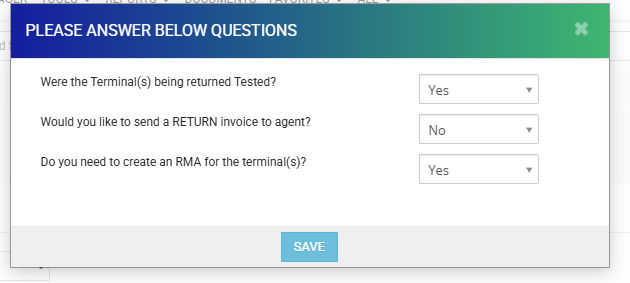
After hitting Save, ensure the answers for the pop-up match the screenshot below, then hit Save.
The CRM will open a new RMA invoice. Just hit “Save” at the bottom to complete it.
4. PREPARE DEVICE FOR RMA
Perform a “reset terminal” procedure on the machine if possible.
Turn device off.
Place in box labeled “VALOR RMA” in tech inventory room.
5. SEND DEVICE(S) TO VALOR
Once per week, send the RMA devices to Valor.
We can either:
Ship devices to Valor office (2 Jericho Plaza, Ste 304, Jericho, NY 11753)
Have someone bring the devices to the Valor office.
6. RMA RETURN PROCEDURE
RMA returns fall into two categories: replacements and repairs.
Replacements are new serial numbers issued when the submitted device is deemed unfixable and in warranty.
Repairs are the same serial number returned when the device is fixed and refurbished.
Replacements
New serial numbers need to be connected to the original serial number that was submitted. Valor sends an email when a device is approved for replacement. In that email, they list the original serial number and the new serial number replacing it.
See example Freshdesk email: https://support.merchantindustry.com/a/tickets/396943
Scan new replacements into inventory.
Invoice device to the ISO it is owed to at $0. Place “RMA REPLACEMENT” in house notes.
Exception: For terminals owed to house (Merchant Industry LLC, NY Direct Sales, Online Sales), place terminals back into inventory. No further steps are needed.
Repairs
Valor sends an email when devices are approved for repair.
See example: https://support.merchantindustry.com/a/tickets/396952
Test device to ensure functionality.
Re-invoice the device back to the ISO at $0.
7. CONTACT ISO
Email and call the ISO to let them know the RMA owed to them has arrived. ISOs have the option of having the terminal shipped to them at their cost (invoice) or picking the terminal up from the MI office.
ISOs must respond to the email or call within 3 business days. After 3 business days, ship the device to their address on file and invoice them for shipping.
See example email here: https://support.merchantindustry.com/a/tickets/400096
8. RMA SPREADSHEET
Please fill out the sections under VALOR RMA REPLACEMENT LOG and VALOR RMA FIXES LOG, copying the examples already there.
Was this article helpful?
That’s Great!
Thank you for your feedback
Sorry! We couldn't be helpful
Thank you for your feedback
Feedback sent
We appreciate your effort and will try to fix the article