Disable SMS Receipt Prompt (Classic Valor Por
The SMS prompt is disabled in Valor Paytech Online Portal
- Enter the merchant's EPI in Device Management.
- Select the three dots and click on "Edit Parameters'.
- Navigate to the Receipt Tab and enable the 'Hide Receipt Option'. Then Click on 'Save'
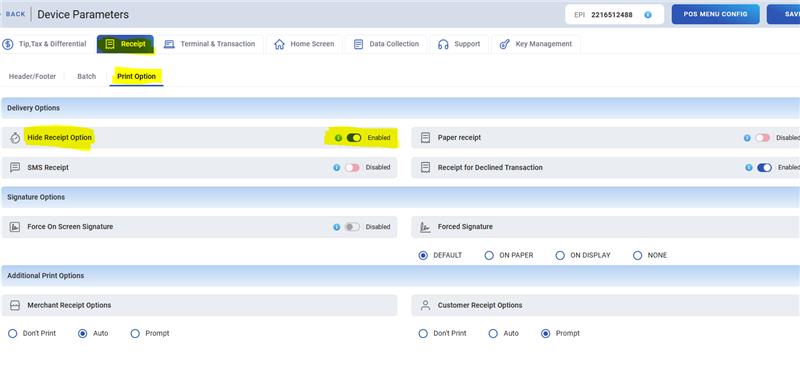
- Perform a download on terminal.
- For VL/VP 100 and VL110: Tap the Star Icon, #6 and Enter
- For VL/VP 500: Go to Menu, Select Updates, and press Enter
Was this article helpful?
That’s Great!
Thank you for your feedback
Sorry! We couldn't be helpful
Thank you for your feedback
Feedback sent
We appreciate your effort and will try to fix the article